오늘 한 것!
장장 6시간의 삽질끝에 얻어낸 수확!
- 이미지 업로드
- 요소들 배치

그리드(Grid)
화면의 창 구성을 나누어주는 것
<Grid>
        <Grid.RowDefinitions>
            <RowDefinition Height="1*"></RowDefinition>
            <RowDefinition Height="3*"></RowDefinition>
            <RowDefinition Height="1*"></RowDefinition>
        </Grid.RowDefinitions>
        <ProgressBar
            Grid.Row="0"
            Name="ProgressBar1"
            Value="0"
            Height="10"
            ValueChanged="ProgressBar_ValueChanged"/>
        <Grid Grid.Row="1">
            <Grid.ColumnDefinitions>
                <ColumnDefinition Width="1*"></ColumnDefinition>
                <ColumnDefinition Width="1*"></ColumnDefinition>
            </Grid.ColumnDefinitions>
            <Image Name="image1"/>
            <Image Name="image2" Grid.Column="1"/>
        </Grid>
        <Button
            Grid.Row="2"
            Style="{StaticResource MaterialDesignRaisedDarkButton}"
            Width="100"
            ToolTip="Resource name: MaterialDesignRaisedLightDarkButton" Cursor="Hand" Click="Button_Click">
            게임시작
        </Button>

        <Label Name="lblInfo1" Content="위치1" HorizontalAlignment="Left" Margin="40,375,0,0" VerticalAlignment="Top"/>
        <Label Name="lblInfo2" Content="위치2" HorizontalAlignment="Left" Margin="40,397,0,0" VerticalAlignment="Top"/>

    </Grid>
Row와 Col로 나누어 그리드가 작성되어있다.
전체의 큰 틀의 그리드 안에 가로, 세로로 여러가지 그리드를 또 나누었다.
Height의 "1*"과 같은 표현은 비율을 의미한다고한다.
위의 1* 3* 1*은 1:3:1의 비율로 볼 수 있다.
안에 그냥 숫자를 적으면 픽셀을 의미한다.
Grid.Row / Grid.Column : 작성된 그리드에 대한 번호를 부여하는 것이다!
코드상으로는 현재 아래 사진처럼 그리드가 구성되어있다.

사진 띄우기
image1.Source = new BitmapImage(new Uri(string.Format("map/{0}.png", 1), UriKind.Relative));나는 사진의 파일이름을 1,2,3,4,5 ... 순으로 정수로 나아가게 만들 것이다.
파일 이름과 위치는 map폴더 안의 정수이름을 가진 파일로 지정했다.
따라서 파일 위치를 "map/{0}.png" 로 string Format을 이용해서 지었다.
※ 이 때 .Net Core라면 주의할 점! ※
이미지 파일을 우클릭하여 속성에 들어가 준뒤
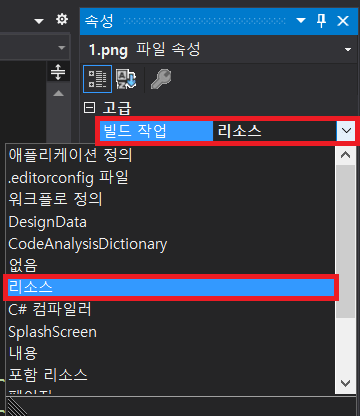
빌드작업을 "리소스"로 하셔야 사진이 뜹니다^^
저 이거 안 해서 5시간 삽질 했어요><
너무 신이나요!
해결했을 때의 다른분들과 저의 허탈감이란....
딜레이
private static DateTime Delay(int MS)
        {
            DateTime ThisMoment = DateTime.Now;
            TimeSpan duration = new TimeSpan(0, 0, 0, 0, MS);
            DateTime AfterWards = ThisMoment.Add(duration);

            while (AfterWards >= ThisMoment)
            {
                ThisMoment = DateTime.Now;
            }
            return DateTime.Now;
        }
다른분 코드 복붙했읍니다...ㅎㅎ
이 코드를 갖다 옮겨 줍니다.
사용할 때의 주의점!
public async void UploadImage()
        {

            while (true)
            {
                image1.Source = new BitmapImage(new Uri(string.Format("map/{0}.png", 1), UriKind.Relative));
                image2.Source = new BitmapImage(new Uri(string.Format("map/{0}.png", 2), UriKind.Relative));
                await Task.Delay(5000);
                image1.Source = new BitmapImage(new Uri(string.Format("map/{0}.png", 3), UriKind.Relative));
                image2.Source = new BitmapImage(new Uri(string.Format("map/{0}.png", 4), UriKind.Relative));
                await Task.Delay(5000);
            }

        }
사용할 함수에
async와 await를 붙여주어야 합니다.
Thread로 block wait를 걸거나 한다면 프로그램이 멈추는 동안은
정말 멈추는 거라 (응답없음)이 뜨게 될 것입니다.
위의 방법이
시간아! 멈춰라! 해서 나 포함 온 세상이 모두 멈춰버린상황
코드로 작성된 방법이
너 이 시간동안만 다른 거 하고 있어봐! 이거 끝나서 값 받아오면 실행해
따라서 이런 느낌!
따라서 위에 작성된 코드는
함수에서 await Task.Delay(5000);을 넣게되면
- 입력된 시간동안 입력받은 시간동안 시간을 측정하는 일을 시킨다.
- 일이 끝난다면 반환을 한다.
- 반환값을 받았을 때 다음 코드를 실행한다.
- 시간을 멈춘것 처럼 느껴짐
결과물
'부장님의 이야기' 카테고리의 다른 글
| [Windows API] 윈도우 프로그래밍 개요 (0) | 2020.07.14 |
|---|---|
| [WPF] : Draw Shapes! 그림 그리기 (0) | 2020.07.09 |
| [WPF-Find Different] : #2 마우스클릭 이벤트 (0) | 2020.05.14 |
| [Find Different] : #1 타이머 만들기 (0) | 2020.05.11 |
| [WPF] Material Design 적용 (1) | 2020.05.11 |


